Tools
Tools the Vayu desktop provides beyond its configs. The first set is for AI agents. Click a tool in the table to jump to its section.
AI tools
Vayu gives AI agents (Claude Code, Codex, Aider, or anything that can run a shell command or speak MCP) desktop tools of their own, so working with an agent doesn’t mean copying commands back and forth. Every tool keeps you in charge: an agent can ask, only you can approve.
| Tool | What it does | How agents use it |
|---|---|---|
| dvarapala | Runs the commands an agent can’t run itself, as root or as you, after you see each one and why (marked ROOT or YOU) and tick which to allow; your password once for the root ones. | dvarapala (JSON on stdin), or the MCP tool request_commands |
| vishvakarma | Every skill and MCP tool of Vayu’s, in every agent (Claude Code on every account, Codex, opencode, Gemini CLI), every session. | Nothing to do: it’s already there |
| ekatva | Your phone: status, ring, lock, SMS, calls, its clipboard and files; an SMS or a call only after you allow it. | ekatva mcp (MCP server), or the ekatva command |
| sutradhar | Your real browser (Chrome, Firefox, Zen): tabs, reading pages, clicking, typing, uploads, downloads, like you; payments, passwords and OTPs are always handed to you. | sutradhar mcp (MCP server), or sutradhar call <tool> [json] |
| sangam | Your GitHub pull requests: list, read, diff; comment, review and merge after you approve in a tmux popup. | sangam mcp (MCP server), or sangam call <tool> [json] |
Each is its own repository (Vayu’s plugin rule), cloned by install.sh and
installed root-owned, so an agent can’t change what it shows you or what it
runs. vayu-verify checks them.
dvarapala
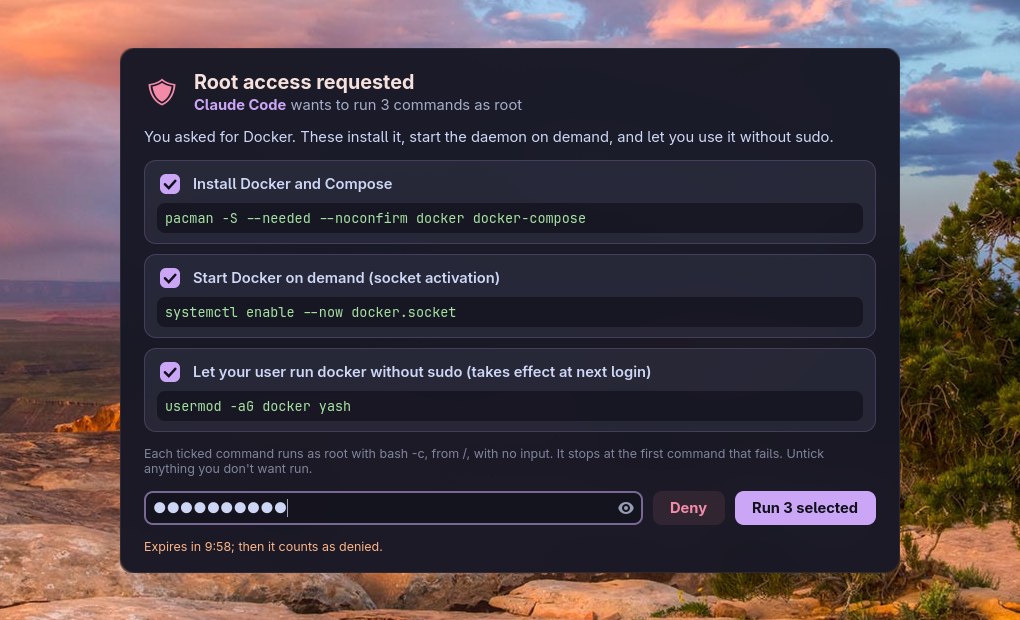
Root commands, approved once. When an agent needs something done as
root (install a package, enable a service, edit a file under /etc), it
sends the commands to dvarapala
(द्वारपाल, “permission”) instead of asking you to paste them into a terminal.
A window shows every command and why; you untick what you don’t want and
type your password once; the agent gets the results as JSON. It was called
vayu-elevate until 2026-10-21, and that name still works (a link).
Since 1.4.0 it also takes commands that don’t need root but that the agent
can’t run itself (its sandbox blocks the network or a folder):
"as": "user", with a cwd. They show in the same window with a YOU
badge (root ones: a red ROOT badge), run as you with a click, no
password, and return the same way.
Since 1.5.0 the window closes as soon as you answer; the commands run on
without it and the agent waits for the results. Ctrl+H hides it at any
time (not an answer: left unanswered, the request expires as denied).
| At a glance | |
|---|---|
| Command | dvarapala (JSON on stdin, or --cmd/--why pairs) |
| MCP | dvarapala --mcp, tool request_commands (also listed as request_root_commands) |
| Runs as | root, bash -c, from /, no stdin, 30 min per command |
| Expires | after 10 minutes without an answer (counts as denied) |
| Logs | /var/log/dvarapala.log (root-only), ~/.local/state/dvarapala/requests.jsonl |
| In Vayu | cloned to ~/.local/share/dvarapala, installed root-owned by its install.sh (install.sh step “Installing dvarapala”) |
| Docs | the README: the request and result formats, MCP setup, the security model |
Claude Code on this desktop is told to use it in the global
~/.claude/CLAUDE.md (the stowed claude/ package). Problems: the “AI
tools” entries in Troubleshooting.
sutradhar
Your browser, for agents. sutradhar is an extension for Chrome, Firefox and Zen plus a local daemon, in place of Claude in Chrome, for every agent. An agent opens tabs in its own tab group, reads pages as a tree of controls, and clicks, types, uploads and downloads as you would. Anything that is yours to do (a payment, a card number, a password, an OTP, a CAPTCHA) stops it: a notification goes out at once, the tab comes forward with a yellow Your turn card, you do it and press Done. Send, publish and delete wait for your Allow.
| At a glance | |
|---|---|
| MCP | sutradhar mcp --name <agent> (vishvakarma gives it to every agent) |
| Command | sutradhar status, sutradhar call <tool> [json], sutradhar log |
| Stop | Super+Shift+Delete, the toolbar panel, or sutradhar stop |
| Install the extension | sutradhar install prints the paths: Zen takes the .xpi, Chrome loads dist/chrome unpacked |
| Docs | the README |
sangam
Pull requests, for agents too. sangam
(the prefix G PR popup) is also an MCP server, so an agent can see the
PRs you see (the same accounts and sections) and act on them with your
yes. Reading is free; a comment, review or merge opens a popup on your tmux
client showing the PR, the account and the text: y approves, n
declines, e edits the text first. Without tmux a notification with
Approve / Decline asks instead.
| At a glance | |
|---|---|
| MCP | sangam mcp; register with claude mcp add --scope user sangam -- sangam mcp |
| Command | sangam call lists the tools; sangam call pr_view '{"pr":"owner/repo#12"}' |
| Tools | pr_accounts, pr_counts, pr_list, pr_view, pr_diff; asking first: pr_comment, pr_review, pr_merge |
| Account | the one picked in sangam (u), else gh’s active one: the same as the tmux PR capsule |
| Expires | 10 minutes without an answer (counts as declined) |
| Docs | the README |
The popup is a consent step, not a sandbox: an agent with a shell can run
gh itself. A write through sangam also makes the tmux PR capsule recount
at once.
ekatva
Your phone, for agents too. ekatva
(एकत्व, “oneness”) links the laptop and your Android phone end to end,
from any network (a Cloudflare quick tunnel when they’re apart). Its
ekatva mcp server lets an agent check the phone, ring or lock it, read
SMS, use its clipboard and files and keep the laptop awake. Sending an SMS
or placing a call opens an Allow / Decline dialog with the number and
the text first.
| At a glance | |
|---|---|
| MCP | ekatva mcp; registered with claude mcp add --scope user ekatva -e EKATVA_AGENT=claude -- ekatva mcp |
| Tools | status, phone_status, phone_ring, phone_lock, sms_threads, sms_read, call_hang_up, phone_clipboard_get/_set, phone_files_list/_read, jyoti_set, log_recent; asking first: sms_send, call_dial |
| Log | every call is in ekatva’s action log as yash via claude (EKATVA_AGENT); ekatva undo N |
| Service | ekatva.service (user unit, in sway-session.sh’s UNITS); the window is Super+o |
| Docs | For AI agents |
Messages, the phone’s clipboard and files come back inside <untrusted>
blocks: they were written by other people. The dialog is a consent step,
not a sandbox: an agent with a shell can run ekatva itself.
vishvakarma
Every skill and tool, in every agent. vishvakarma
(विश्वकर्मा, “skill”) keeps Vayu’s skills (folders with a SKILL.md, the open
Agent Skills format) and the MCP servers above in one place, and vishvakarma
sync puts them into every agent it finds: Claude Code, on every vesha
account (each profile has its own MCP config), Codex, opencode, Gemini CLI,
and ~/.agents/skills for any agent following the convention. It runs at
login (vishvakarma.service, in sway-session.sh’s UNITS) and whenever
kosha installs or updates vishvakarma, so a new agent or account has everything
without asking.
| At a glance | |
|---|---|
| Skills | dsr: the Daily Status Report, from the day’s commits to an HTML table sent as a reply-all in the DSR thread (settings: ~/.config/vishvakarma/dsr.toml) |
| Yours | vishvakarma new NAME (in ~/.config/vishvakarma/skills), tools in ~/.config/vishvakarma/mcp.toml |
| App | prefix A (or “vishvakarma” in the launcher, vishvakarma ui): every skill, tool and agent; read, edit and create skills, test a tool, sync, doctor, turn things off |
| Check | vishvakarma doctor; vishvakarma lists skills, servers and agents |
| Safe | changes only what it added (recorded) and its marked blocks; a skill or server of yours with the same name wins; vishvakarma unsync takes it all back |
| Docs | theyashsawarkar.github.io/vishvakarma: how it works and why (decision records) |
How it works in Vayu
From a fresh install to an agent’s first message:
- Installed with the rest.
install.shinstalls every package inKOSHA_PACKAGES, vishvakarma among them; kosha runs vishvakarma’s owninstall.sh, which links~/.local/bin/vishvakarmaand~/.config/systemd/user/vishvakarma.serviceand syncs once. - Synced at every login.
sway-session.shstartsvishvakarma.servicewith the session’s other units: a oneshot that runsvishvakarma sync. It finds every agent on the machine (by its command on PATH or its config folder) and every vesha account, and gives each what it’s missing. - Synced when vishvakarma changes.
kosha updateof vishvakarma syncs at once (new skills, new tools in its list). A tool you install or remove with kosha (narada, say) reaches the agents at the next login, or right away withvishvakarma sync. - The agent starts (a terminal, tmux, an editor, the launcher: it doesn’t matter) and loads its config as always: the MCP servers are there, and so are the skills, which it reads itself (Claude Code, Codex, opencode) or through the index in its instructions file (Gemini CLI). When a request matches a skill’s description (“send my DSR”), the agent opens that skill and follows it.
Where each piece lives:
| Piece | Where |
|---|---|
| Vayu’s skills and tool list | the vishvakarma repo (skills/, mcp.toml), installed at ~/.local/share/vishvakarma |
| Your skills, tools and skill settings | ~/.config/vishvakarma/ (skills/, mcp.toml, dsr.toml); never in a repo |
| What vishvakarma added to each agent | ~/.local/state/vishvakarma/state.json |
| The login sync | vishvakarma.service (journalctl --user -u vishvakarma) |
Adding to it. A new Vayu skill is a folder in the vishvakarma repo
(skills/<name>/SKILL.md, its scripts and tests), released and picked up
by kosha update; a new agent-facing tool is an entry in its mcp.toml.
Never register a tool or copy a skill into one agent by hand: the others
wouldn’t get it (this file’s rule for agents, and CLAUDE.md’s). A skill
just for you: vishvakarma new NAME, then vishvakarma sync.
A new agent or account needs nothing: install Codex, or add a Claude
account with vesha, and it has everything at the next login, or now with
vishvakarma sync. Agent sessions already running keep what they started
with; restart them to pick up a change.